After installing, InPost by Progus opens on Dashboard. The Setup guide card there is the whole setup: five tasks, in order. Below it, Operational status shows what is on and what is not, so you can come back and check any time.
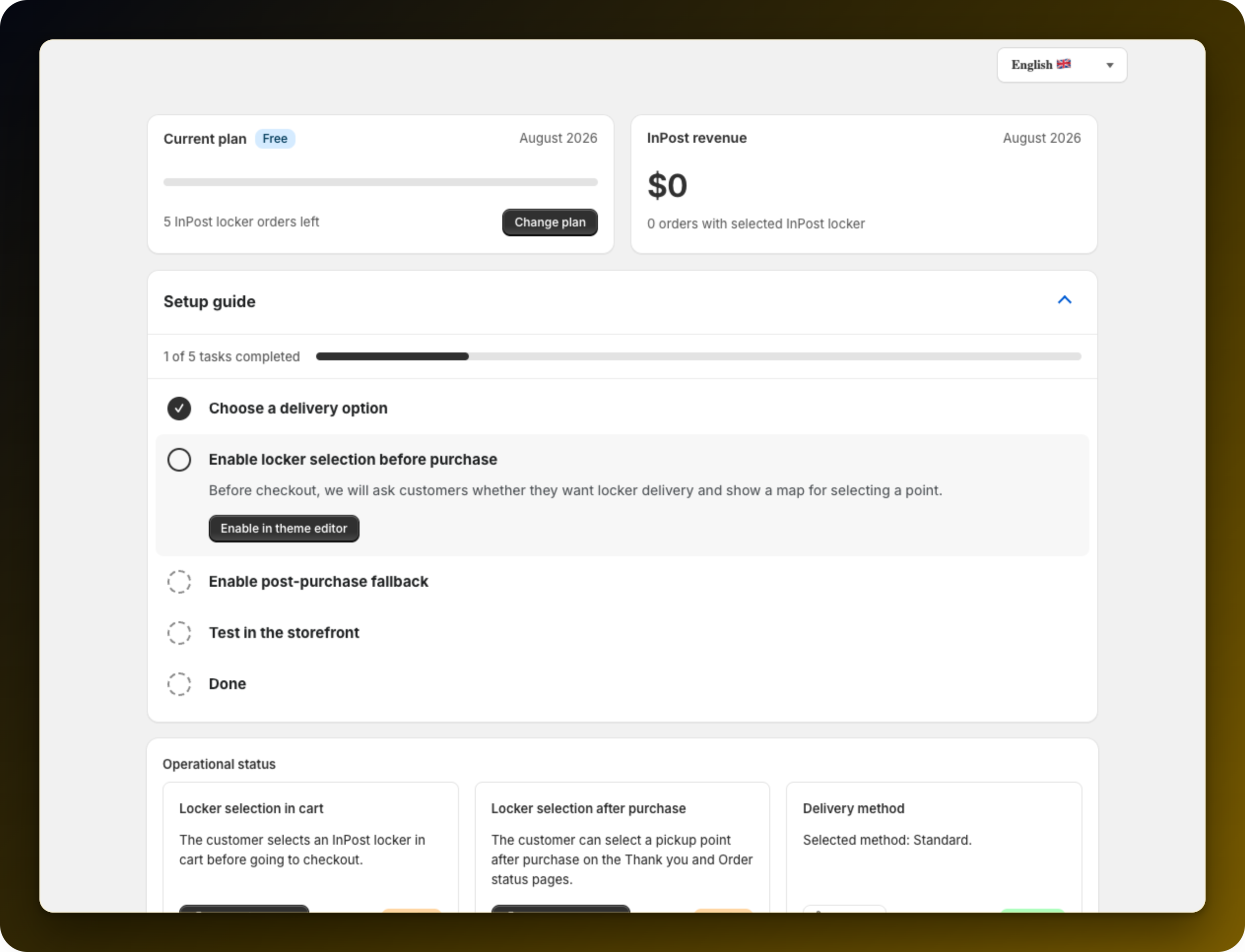
The first task takes you to Settings, where you tell the app which of your Shopify shipping rates means pickup point delivery. Until you do this, nothing changes at checkout. The card is Delivery method on the General tab.
This turns on the app embed in your theme, which puts the pickup panel next to the checkout button in the cart. The button Enable in theme editor opens the theme editor at the right place.
This adds a block to the Thank you page and to the Order status page, so a customer who did not pick a point before paying can still pick one afterwards. Add both blocks. With only one in place the task stays unfinished.
Run through your own shop: add a product to the cart, click checkout, choose the InPost locker option, then pick a point and finish the order.
Press Everything works to close the guide. Nothing is locked afterwards, and Operational status stays on the dashboard as your check from then on.
Pick the right rate in Delivery method: with the wrong one, pickup selection never works at checkout.
Add both post-purchase blocks, not just the Thank you one.
See how many pickup orders your plan covers in InPost plans: what each one includes.
Stuck on any of this? Open the chat in the bottom right corner of the app and we will help you set it up.
